HaloVPN: Fast Secure VPN Proxy
- 4.5
- Rating
- 10.00M
- Installs
- Free
- Price

 Analysis by App-foxy
I approached HaloVPN: Fast Secure VPN Proxy as a practical tool rather than something I would leave running without thinking. It is a free VPN app from Halo Online, placed in the Tools category, and its main appeal is straightforward: it gives you a way to route your connection through a VPN when you want extra privacy on an unfamiliar network or need to test whether a connection behaves differently through another route. The app is aimed at Everyone, so the presentation is accessible even if you have never used a VPN before.
My first impression was that the basic idea is easy to understand, but VPN apps can still create confusion at the exact moment you need them. A connection may fail because of the network, the phone, another VPN profile, or the destination service rather than because of the app itself. That is why I found HaloVPN most useful when treated as a focused connection tool: open it, check the state of the connection, use it for a specific task, and disconnect when the task is complete.
Getting past the points where VPN use usually stalls
The most common sticking point is not downloading the app; it is knowing what should happen after the first tap. Android normally asks for permission before an app can create a VPN connection. That system message is expected, and accepting it does not mean HaloVPN can read everything on your phone. It means Android is allowing the app to establish the VPN tunnel. If you dismiss that prompt, the app cannot do its main job, so reopening it and approving the request is the sensible first recovery step.
You May Also Like

 Blood Strike: 2.5 Anniversary
Blood Strike’s Loadouts Turn Every Drop Into a Tactical Gamble
A close look at Blood Strike’s custom loadouts: how fast access to signature weapons reshapes its battle royale rhythm, rewards preparation, and narrows the gap between fights.

 Pandora - Music & Podcasts
Pandora’s Music Is Easy to Start, but Harder to Recover
Pandora’s strength is its low-effort path from a seed to a station. Its weak spot is how much confidence it asks you to place in connection, setup, and quiet recovery.

 8 Ball Pool
 Is Built on Rivalries, Rematches, and Routine
A close look at the rivalries, rematches, shared routines, and unanswered safety questions that turn a quick pool match into a persistent mobile community.

 Samsung Music
’s Quiet Strength Is Playing What You Already Own
Its reach comes less from spectacle than from dependable access to a personal library. That simplicity is both the app’s strongest retention engine and its ceiling.

 AccuWeather: Weather Radar
AccuWeather Review: A Quick, Clear Forecast for Everyday Decisions
For everyday plans, the best forecast is the one you can understand quickly. AccuWeather makes rain timing, radar, and local conditions easy to act on, with a few trade-offs.

 Hill Climb Racing
Why Hill Climb Racing Still Turns Crashes Into One More Run
A tiny car, a bumpy hill and one more upgrade: Hill Climb Racing keeps resurfacing because its simple chaos makes every near-miss feel personal.
More From Our News Desk



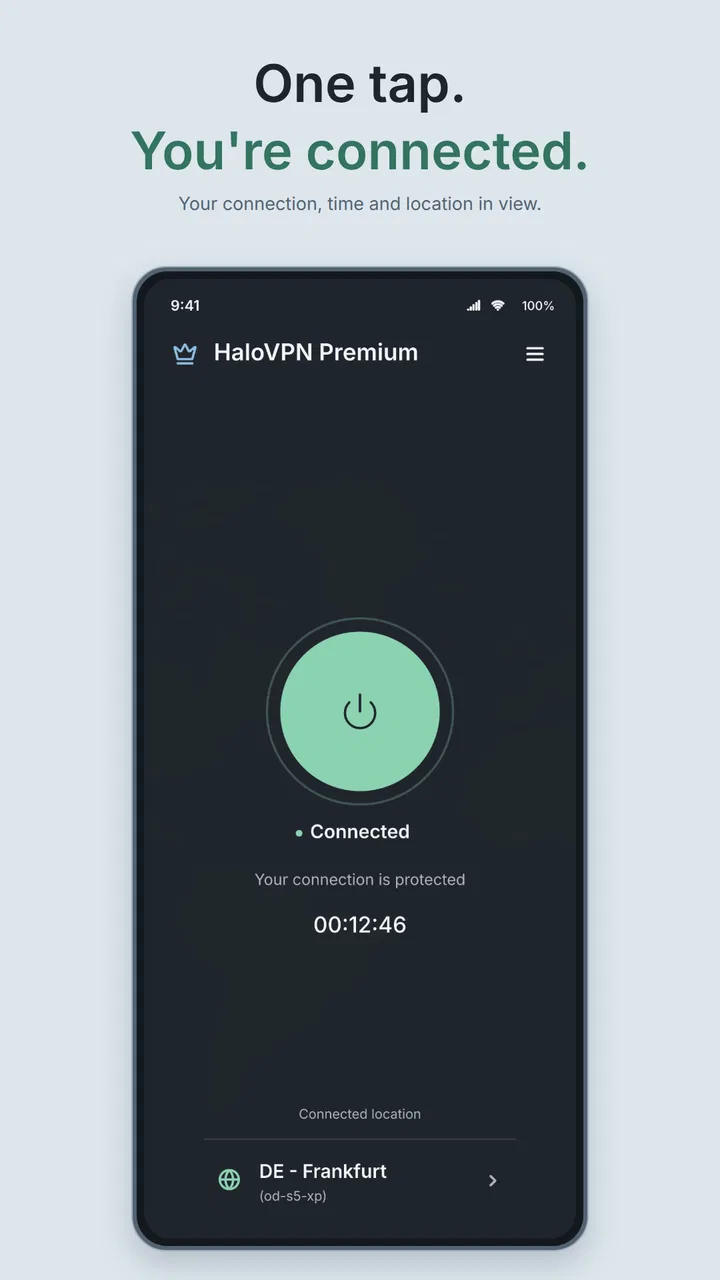
I also recommend checking the phone’s status area instead of relying only on the app screen. Android usually shows a VPN indicator when a VPN profile is active. That small confirmation matters because a button can appear to have been pressed while the connection is still negotiating or has already dropped. If the indicator never appears, I would not assume the connection is protecting traffic yet.
Another source of friction is an existing VPN. Android generally handles one active VPN connection at a time, so a work profile, browser-based privacy tool, security application, or another VPN can interfere. Before blaming HaloVPN, I would open the phone’s network settings and look for an existing VPN entry. Disconnecting the other service, then trying again, is often more useful than repeatedly tapping the connect control.
The same applies to battery restrictions. Some Android phones aggressively limit background activity, especially when the screen turns off. If HaloVPN connects and then disappears after the phone is locked, the problem may be the manufacturer’s battery management rather than the VPN setup. I would check the app’s battery setting and avoid placing it under the most restrictive background mode. The exact menu differs by phone, but the useful clue is a connection that works while the app is open and fails shortly afterward.
Network switching can also make the experience look unreliable. Moving from Wi-Fi to mobile data, entering a building with weak reception, or changing between two access points can interrupt a tunnel. I found it more productive to wait until the underlying connection was stable, then reconnect HaloVPN once. Repeatedly switching networks while the VPN is trying to connect makes it harder to tell which part of the setup is failing.
A clean setup routine that saves time
My preferred setup routine is simple. First, I make sure ordinary internet access works without the VPN. I open a familiar page or service, because there is no point troubleshooting a VPN when the phone is already offline. Next, I close any other VPN connection and confirm that the phone is not in airplane mode. Then I launch HaloVPN, approve Android’s VPN request, and wait for a visible connected state before starting anything sensitive.
If the first attempt does not work, I avoid changing several things at once. I disconnect, wait briefly, and try again on the same network. If that fails, I test the other available connection, such as mobile data instead of Wi-Fi. This two-step comparison is more informative than clearing settings immediately: if one network works and the other does not, the local network is an important suspect.
Public Wi-Fi deserves extra care. Hotel, café, airport, and library networks sometimes require a browser sign-in page before normal internet access is available. In that situation, I first connect to the Wi-Fi without HaloVPN and complete the network’s sign-in process. Only after ordinary browsing works do I start the VPN. Otherwise, the VPN can make the captive portal difficult to reach, leaving the impression that the app is broken when the Wi-Fi has simply not finished authorizing the device.
I would also keep the app updated through the official app store. The current version is 19.0.1, and using the current release is a sensible way to avoid problems already addressed by the developer. Updates do not guarantee that every network will work, but an old installation adds an unnecessary variable when diagnosing connection trouble.
There is a practical privacy habit I consider just as important as connecting: I do not assume that every application behaves identically while a VPN is active. Some apps cache a location, keep an old connection open, or refuse traffic when they detect a VPN. After connecting, I close and reopen the service I actually want to use. That gives it a clean chance to establish a new connection instead of continuing with a session created before HaloVPN was enabled.
Recovering a connection without making the problem worse
When a connection stalls, my first recovery attempt is a clean disconnect and reconnect. I do not immediately uninstall the app, reset all network settings, or change unrelated phone options. I close the app, wait a moment, reopen it, and try once more on the same stable network. This preserves a useful baseline and avoids creating new problems, such as losing saved Wi-Fi details through an unnecessary network reset.
If that does not help, I restart the phone. It sounds basic, but Android’s VPN service can occasionally remain in an awkward state after a network change or after another VPN has been removed. A restart clears more of that temporary state than repeatedly forcing the app to reconnect. Once the phone is back, I test ordinary internet access first and then try HaloVPN again.
For a connection that drops whenever the screen locks, I would investigate battery optimization before reinstalling anything. For a connection that never starts, I would check the VPN permission and competing VPN profiles. For a connection that starts but leaves every app offline, I would disconnect and test the underlying network. These symptoms point to different causes, and treating them as the same issue wastes time.
Reinstalling can be a reasonable last step if the app’s local state appears damaged, but I would use it carefully. Before doing so, I would note any phone-level settings that might need to be approved again, because reinstalling does not remove the possibility of a blocked network, a conflicting VPN, or aggressive battery controls. A fresh install helps when the installation itself is the problem; it cannot repair a Wi-Fi network that blocks VPN traffic.
I also avoid judging speed from a single quick test. A VPN adds another stage to the connection, and performance can vary with the local network, congestion, distance to the available route, and the service being accessed. If one video or website feels slow, I compare it with the same service after disconnecting, then repeat the test later. That does not produce a laboratory measurement, but it does tell me whether HaloVPN is consistently affecting my normal use or whether the destination was having a temporary problem.
When HaloVPN is not the cause
A useful diagnostic distinction is whether all internet access fails or only one destination fails. If every app stops loading after the VPN connects, I look at the network path and the VPN state. If ordinary browsing works but one banking app, streaming service, game, or work portal refuses to open, that service may be restricting VPN traffic or reacting to a changed network location. In that case, disconnecting for that particular task may be the practical answer.
Some websites also challenge a new connection with extra verification. That can feel like a fault because the page worked before the VPN was enabled. I treat the additional check as a response from the website, not proof that the app is unsafe or malfunctioning. If the service is important, I decide whether the privacy benefit of the VPN is worth the extra sign-in step. For a routine purchase or account task, I may use my normal connection; for browsing on an untrusted network, I may prefer to keep the VPN active and complete the verification.
Location-sensitive services are another exception. A VPN can change how a service interprets the connection, which may affect local search results, account checks, advertisements, or access to content. That is not automatically a defect. It is a trade-off built into changing the route of traffic. I would not use HaloVPN as a way to assume that every service will behave as though I were physically somewhere else, and I would not expect it to bypass rules imposed by a particular provider.
Work and school networks deserve a separate warning. Their administrators may require a specific VPN, certificate, or access method. Adding a personal VPN can interfere with those arrangements, especially when internal resources are involved. If I need company or campus access, I follow that organization’s instructions instead of assuming a general-purpose tool is an acceptable replacement.
The app is also not the right choice for someone who needs a highly specialized business VPN, centrally managed accounts, detailed corporate controls, or a guaranteed route for a particular service. HaloVPN makes more sense for personal, occasional use. Someone who needs predictable performance for demanding work should compare a provider and setup designed around that requirement rather than choosing solely because the download is free.
Where it fits in everyday use
One realistic scenario is using a café’s Wi-Fi while answering messages and checking a personal account. I would first complete the café’s network sign-in, confirm that ordinary browsing works, then connect HaloVPN before opening the account. If the connection becomes unstable, I would switch to mobile data rather than repeatedly reconnecting on a weak access point. When leaving, I would disconnect so that later browsing does not unexpectedly pass through the VPN and trigger location or sign-in checks.
Another useful workflow is troubleshooting a website that behaves strangely. I can compare the service with HaloVPN disconnected and connected, using the same phone and network. If the result changes, that tells me the route or network identity matters. It does not tell me that one mode is universally better, but it gives me a practical clue before I start changing browser settings or blaming the website.
I would be more cautious with activities that depend on a stable, low-latency connection. Online games, live calls, remote desktop sessions, and large uploads can be sensitive to route changes and interruptions. A VPN may still be useful for a particular privacy need, but I would test it before an important call or session. If responsiveness becomes noticeably worse, the normal connection may be the better tool for that moment.
Compared with leaving a VPN permanently enabled through a system-wide security suite, HaloVPN feels better suited to deliberate sessions. I can choose when to use it instead of forgetting that every app is passing through a different route. Compared with browser-only privacy tools, it is more relevant when I want protection to apply beyond one browser, although that broader scope also means it can affect banking apps, games, streaming services, and work software. Compared with a paid specialist service, the free approach is attractive for casual use, but I would not select it solely for demanding professional needs.
The app’s popularity gives it a reassuring starting point for many people: it has an average rating of 4.5 from around 168 thousand ratings, and it has passed 10 million installs. Those figures suggest that many users find the basic experience approachable, but they do not remove the need to check whether it suits a particular network or service. A large user base is not a substitute for understanding the trade-offs of VPN use.
My practical verdict after using it
HaloVPN is a sensible free starting point for someone who wants a simple personal VPN tool without committing to a paid plan. I like it most for short, intentional sessions on networks I do not fully trust, and for comparing how a website behaves over a different connection route. The Everyone age rating and straightforward Tools positioning make it approachable, while the developer, Halo Online, has kept the product focused on its central purpose rather than turning this review into a discussion of unrelated extras.
Its main weakness is not necessarily a missing button; it is the uncertainty that appears when a connection fails. A new user may not know whether to check Android’s VPN permission, another active VPN, battery restrictions, Wi-Fi sign-in, or the destination service. Once I separate those possibilities, the app becomes easier to handle. My advice is to establish normal internet access first, connect only after that, confirm Android’s VPN indicator, and use one change at a time when troubleshooting.
I would recommend it to occasional users, travelers, people working from public Wi-Fi, and anyone who wants to experiment with a VPN before considering a more specialized alternative. I would skip it for a managed workplace setup, a service that regularly blocks VPN traffic, or a task where stable latency matters more than privacy on that particular network. In those cases, the usual system connection or an organization-approved solution may be a better fit.
As a free app released on April 12, 2021, it has had time to become a familiar option, and the current release gives Android users a straightforward way to try it. My final view is positive but measured: HaloVPN is most valuable when I use it deliberately, verify that it is actually connected, and understand when the network or destination—not the app—is responsible for the trouble.
FAQs for HaloVPN: Fast Secure VPN Proxy
01What features does HaloVPN offer?
HaloVPN provides a range of features, including military-grade encryption, unlimited bandwidth, and access to servers in multiple countries. It also offers a no-log policy to ensure privacy, a user-friendly interface, and the ability to bypass geo-restrictions for streaming services. These features make it a robust choice for both privacy and accessibility.
02Is HaloVPN safe to use?
Yes, HaloVPN is designed with user safety in mind. It uses AES-256 encryption, one of the most secure encryption standards, to protect your data. Additionally, it maintains a strict no-logs policy, meaning it does not track or store user activity, ensuring your online privacy is safeguarded.
03Can HaloVPN unblock streaming services?
HaloVPN is capable of bypassing geo-restrictions, allowing users to access various streaming services that may be blocked in their region. The app supports multiple server locations, enabling the user to switch easily and enjoy uninterrupted streaming of their favorite content.
04How user-friendly is the HaloVPN app?
HaloVPN is designed with simplicity in mind, featuring a clean and intuitive interface that makes it easy for both beginners and tech-savvy users to navigate. With just a single tap, users can connect to the fastest available server, making the experience seamless and straightforward.
05What platforms does HaloVPN support?
HaloVPN is available for both Android and iOS platforms, ensuring a wide range of compatibility with smartphones and tablets. The app is regularly updated to support the latest operating systems, providing a reliable and consistent experience across various devices.
Pros
- Easy to use with a simple interface.
- High-speed connection ensures smooth browsing.
- Supports multiple devices simultaneously.
- Offers a wide range of global servers.
- No log policy protects user privacy.
Cons
- Free version has limited features.
- Occasional connection drops.
- Ads can be intrusive in free version.
- Limited customer support options.
- Premium version is relatively expensive.

HaloVPN: Fast Secure VPN Proxy
Gallery